
Another post on the theme of giving computers for the holidays. Suppose you're planning on giving a computer, new or used, as a gift to a grandparent or other aging adult. This is great for keeping in touch, sharing photos, etc., but chances are, the recipient isn't very computer savvy. So pretty soon, and fairly often, you are going to have to help them out with either tutoring, tech support, or both. And it may not be convenient or even possible for you to visit them whenever this need arises. So what do you do?
If you've ever tried to do this sort of thing before, then you know just how frustrating it can be to try and get someone to follow instructions over the phone. What's even more difficult at times is trying to understand their description of what is going on they're PC. Wouldn't it be nice if you could see what they're seeing, show them what they should be doing, or even take control, and do it yourself; all without driving over there, and doing it in person? Well there is way, it's easy and it's free!
Just go to www.teamviewere.com. Download the latest version of TeamViewer, and install it on your loved one's PC before you give it as a gift. Team Viewer works in one of two ways. 1) The person needing help gives you an ID number, and a randomly generated pin that will grant you remote access to their computer over the Internet. You will be able to see their screen, control their mouse, and type in commands. 2) If the user allows it, you can even set a password that will let you log in and perform tasks remotely without any intervention at all on the part of the user. They don't even have to be home. As long as their computer is on, you will be able to connect, and work on it at your convenience. And TeamViewer can be installed as a service so you can even perform functions that require a reboot, like software installs and using restore points, etc..
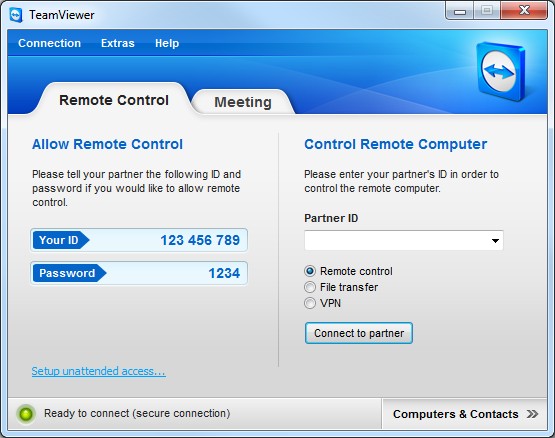
TeamViewer is free for non commercial use, and it's extremely easy to use. All you need is a broadband connection on both ends and you're good to go. There are other programs that offer similar functionality. Some may even have come pre-installed with Windows. But nothing is as slick and easy to use as TeamViewer. Especially if you're working through firewalls, NAT routers and such. Get it, and don't even try anything else! You'll save yourself, and your loved ones a lot of frustration.
All the best,
B.H. :-)
If you've ever tried to do this sort of thing before, then you know just how frustrating it can be to try and get someone to follow instructions over the phone. What's even more difficult at times is trying to understand their description of what is going on they're PC. Wouldn't it be nice if you could see what they're seeing, show them what they should be doing, or even take control, and do it yourself; all without driving over there, and doing it in person? Well there is way, it's easy and it's free!
Just go to www.teamviewere.com. Download the latest version of TeamViewer, and install it on your loved one's PC before you give it as a gift. Team Viewer works in one of two ways. 1) The person needing help gives you an ID number, and a randomly generated pin that will grant you remote access to their computer over the Internet. You will be able to see their screen, control their mouse, and type in commands. 2) If the user allows it, you can even set a password that will let you log in and perform tasks remotely without any intervention at all on the part of the user. They don't even have to be home. As long as their computer is on, you will be able to connect, and work on it at your convenience. And TeamViewer can be installed as a service so you can even perform functions that require a reboot, like software installs and using restore points, etc..
TeamViewer is free for non commercial use, and it's extremely easy to use. All you need is a broadband connection on both ends and you're good to go. There are other programs that offer similar functionality. Some may even have come pre-installed with Windows. But nothing is as slick and easy to use as TeamViewer. Especially if you're working through firewalls, NAT routers and such. Get it, and don't even try anything else! You'll save yourself, and your loved ones a lot of frustration.
All the best,
B.H. :-)


